2019 - 2022

Ludwig.guru

Ludwig.guru

Ludwig.guru

Freemium SaaS solution tailored for crafting technical and specific content in English, leveraging a range of tools

Freemium SaaS solution tailored for crafting technical and specific content in English, leveraging a range of tools

UX Analysis

User Surveys

UX/UI Design

Design System

Assessment

Assessment

Assessment

My work for Ludwig began with an evaluation of existing products. This involved conducting a heuristic analysis, studying analytics, received feedback, and conducting user surveys. In particular, the focus was initially on studying the user profile and the context of use to highlight the main pain points and opportunities. Based on the insights gathered, initial objectives were then defined.

1 Mln

1 Mln

Daily Active Users

Daily Active Users

35%

35%

Mobile Usage

Mobile Usage

47%

47%

25 - 34 y.o. students

25 - 34 y.o. students

1 Mln

Daily Active Users

35%

Mobile Usage

47%

25 - 34 y.o. students

Traffic

Desktop

Mobile

USA

India

UK

Philippines

Canada

Hong Kong

Malaysia

Vietnam

Australia

Italy

Japan

Singabpore

Traffic

Desktop

Mobile

USA

India

UK

Philippines

Canada

Hong Kong

Malaysia

Vietnam

Australia

Italy

Japan

Singabpore

Main Pain Points

Main Pain Points

Unclear utility of the tool

Unclear utility of the tool

Mobile usability issues

Mobile usability issues

Desktop app issues

Desktop app issues

Insufficient search results

Insufficient search results

Main Opportunities

Main Opportunities

Add explanatory content

Add explanatory content

Improving mobile UX

Improving mobile UX

Fixing the desktop app

Fixing the desktop app

Introduce custom sources

Introduce custom sources

1 Mln

Daily Active Users

35%

Mobile Usage

47%

25 - 34 y.o. students

1 Mln

Daily Active Users

35%

Mobile Usage

47%

25 - 34 y.o. students

Traffic

Desktop

Mobile

USA

India

UK

Philippines

Canada

Hong Kong

Malaysia

Vietnam

Australia

Italy

Japan

Singabpore

Main Pain Points

Unclear utility of the tool

Mobile usability issues

Desktop app issues

Insufficient search results

Main Opportunities

Add explanatory content

Improving mobile UX

Fixing the desktop app

Introduce custom sources

Mobile

Mobile

Mobile

One of the insights gathered from the research allowed us to observe that although the service was most heavily used on desktop, mobile devices were overall utilized by more users to complement their study or work activities. To enhance this experience, navigation was redesigned, text and contrasts were aligned with accessibility standards, and the search and result consumption experience were improved by adapting them to the viewport and typical gestures of mobile devices.

Contextual assistance

Contextual assistance

Contextual assistance

One of the main friction points identified in the study of the usage context is that the tool is used alongside text editors, requiring continuous switching between interfaces. For this reason, we developed the desktop app and the Chrome extension to make the transition as seamless as possible. The desktop app can be resized, pinned as an overlay, and called up via shortcut, while the extension can be quickly accessed from the browser without being intrusive.

Design System

Design System

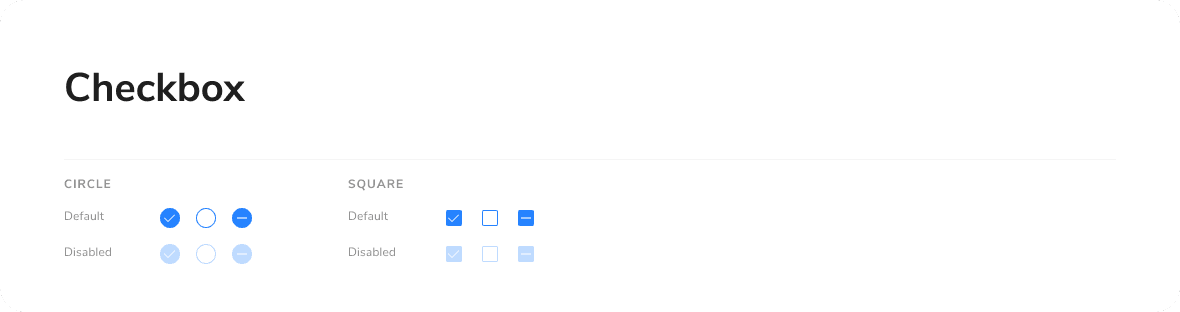
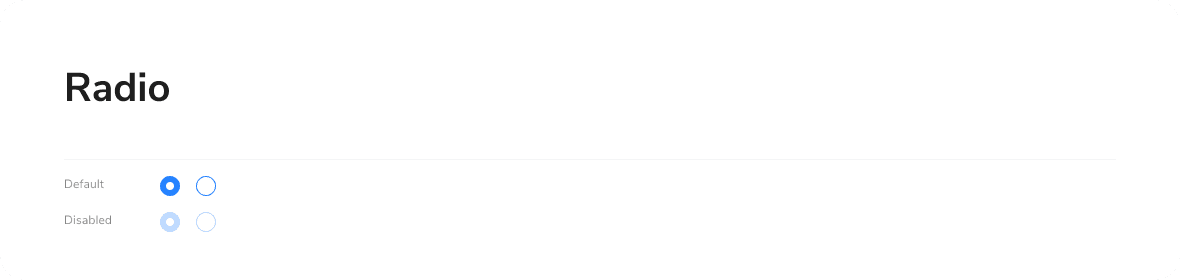
Needing to expand the set of tools offered, there arose the necessity to align the components both to ensure a more seamless user experience and to optimize development operations. For this reason, I developed a design system that defined the styles and characteristics of the main components. Adopting an atomic approach, I started with the simplest ones such as the icon set and buttons, and progressed to more complex ones like filters and modals, creating guidelines for the creation of any new elements.

Design System

Needing to expand the set of tools offered, there arose the necessity to align the components both to ensure a more seamless user experience and to optimize development operations. For this reason, I developed a design system that defined the styles and characteristics of the main components. Adopting an atomic approach, I started with the simplest ones such as the icon set and buttons, and progressed to more complex ones like filters and modals, creating guidelines for the creation of any new elements.

Improving clarity

Improving clarity

Improving clarity

In order to clarify the utility of Ludwig and improve the clarity of its functioning, we integrated some explanatory content such as onboarding, tooltips, captions, animations, and banners. This was particularly useful for introducing new tools and features.

Achievements

Achievements

Achievements

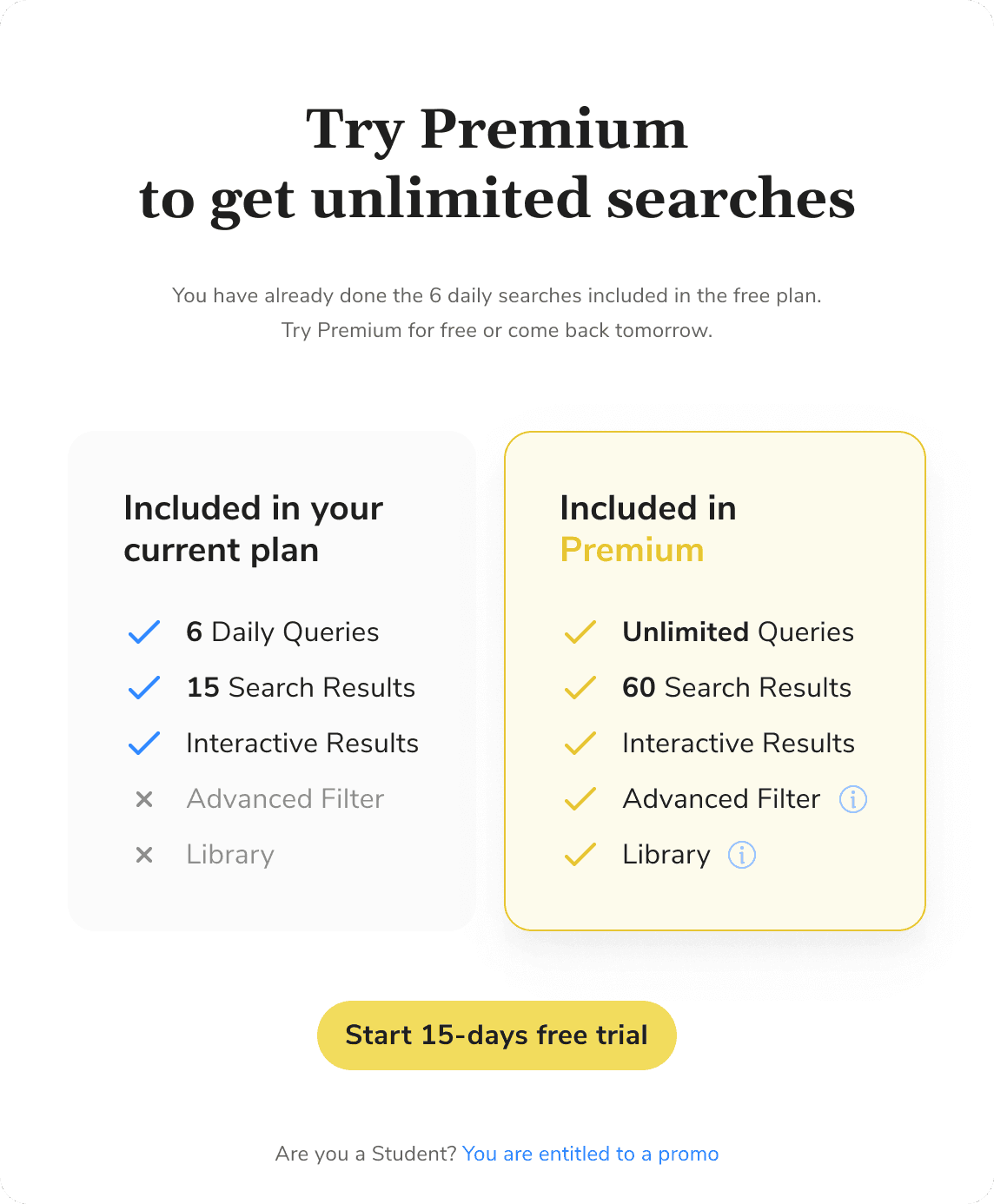
Over the span of 2 years, Daily Active Users increased from 1 to 5 million, and we were able to implement various strategies to increase conversions. These included a clearer and more guided checkout process, new plans tailored for specific user profiles, and new features enabling a personalized experience such as saving favorites and uploading custom sources.

Menu Navigation

We designed Library, a feature that enables users to upload custom thematic sources, organize them into categories with a file management system, and tag them for targeted searches.

Mobile Dashboard
Mobile Inputs
Mobile Options
Mobile Dashboard
Mobile Options
Mobile Inputs
Mobile Dashboard
Mobile Inputs
Mobile Options

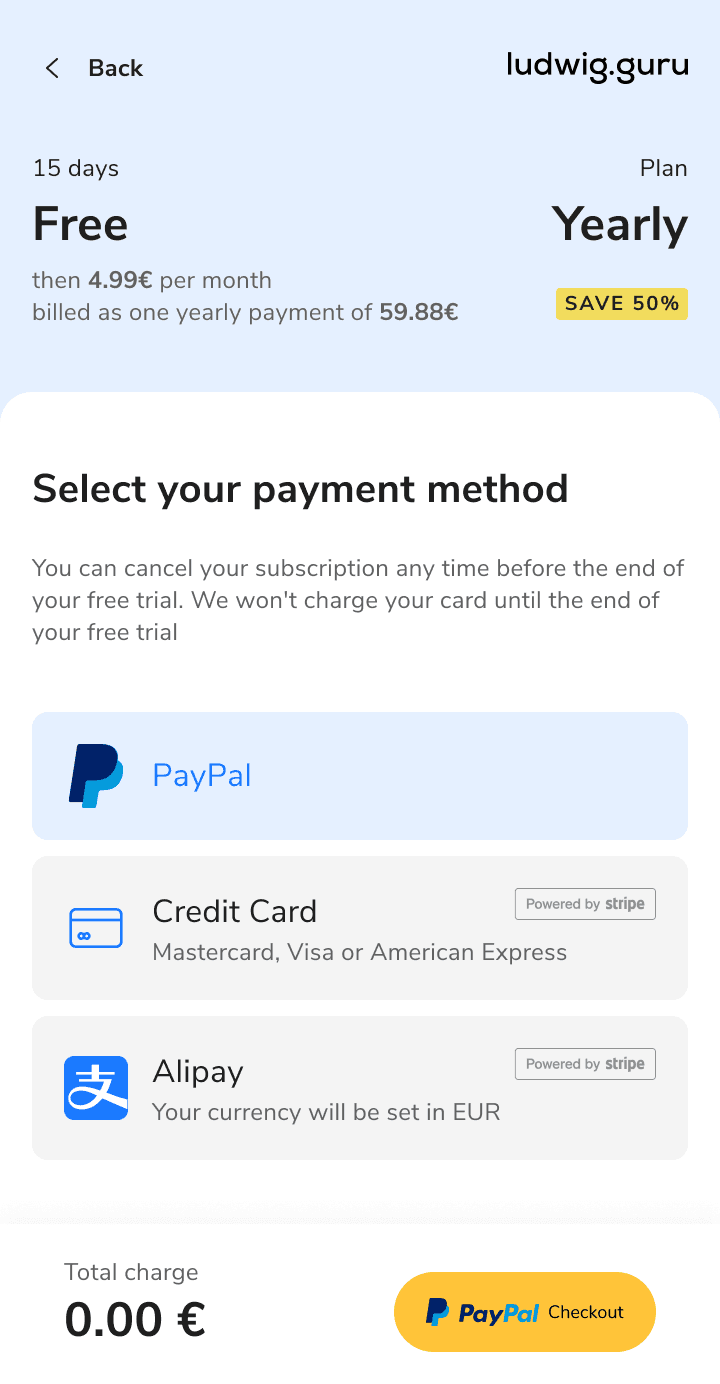
I improved the clarity, transparency, and perceived trust in the checkout flow by optimizing its UI and microcopy. This resulted in a higher conversion rate for trial sign-ups.

Mobile Dashboard
Mobile Dashboard
Mobile Options

We introduced new subscription plans to meet the needs of specific user segments identified during research, which increased conversions to the Premium service.

Menu Navigation

We ran A/B tests on various paywall solutions, ad placements, and ad types to optimize conversions, advertising revenue, and the overall user experience.

Mobile Dashboard

I designed an integrated text editor, allowing users to access all features while reducing the friction of switching between multiple windows.

Menu Navigation

We designed Library, a feature that enables users to upload custom thematic sources, organize them into categories with a file management system, and tag them for targeted searches.

Mobile Dashboard
Mobile Inputs
Mobile Options
Mobile Dashboard
Mobile Options
Mobile Inputs
Mobile Dashboard
Mobile Inputs
Mobile Options

I improved the clarity, transparency, and perceived trust in the checkout flow by optimizing its UI and microcopy. This resulted in a higher conversion rate for trial sign-ups.

Mobile Dashboard
Mobile Dashboard
Mobile Options

We introduced new subscription plans to meet the needs of specific user segments identified during research, which increased conversions to the Premium service.

Menu Navigation

We ran A/B tests on various paywall solutions, ad placements, and ad types to optimize conversions, advertising revenue, and the overall user experience.

Mobile Dashboard

I designed an integrated text editor, allowing users to access all features while reducing the friction of switching between multiple windows.

Menu Navigation

We designed Library, a feature that enables users to upload custom thematic sources, organize them into categories with a file management system, and tag them for targeted searches.

Mobile Dashboard
Mobile Inputs
Mobile Options
Mobile Dashboard
Mobile Options
Mobile Inputs
Mobile Dashboard
Mobile Inputs
Mobile Options

I improved the clarity, transparency, and perceived trust in the checkout flow by optimizing its UI and microcopy. This resulted in a higher conversion rate for trial sign-ups.

Mobile Dashboard
Mobile Dashboard
Mobile Options

We introduced new subscription plans to meet the needs of specific user segments identified during research, which increased conversions to the Premium service.

Menu Navigation

We ran A/B tests on various paywall solutions, ad placements, and ad types to optimize conversions, advertising revenue, and the overall user experience.

Mobile Dashboard

I designed an integrated text editor, allowing users to access all features while reducing the friction of switching between multiple windows.

Create a free website with Framer, the website builder loved by startups, designers and agencies.